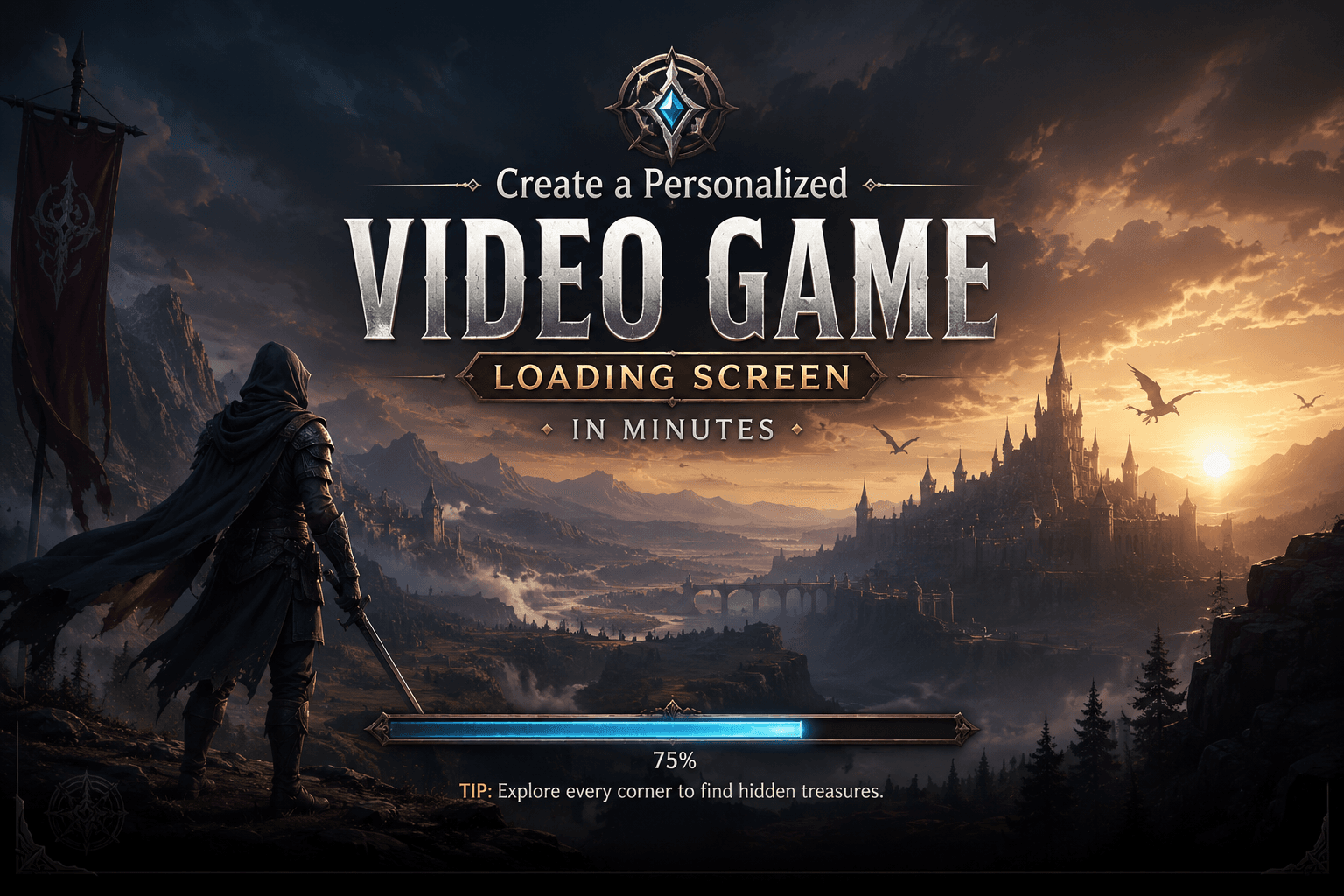
A Personalized Video Game Loading Screen is much more than a simple waiting page between gameplay sessions. Modern gamers expect visually appealing, interactive, and immersive loading screens that enhance the gaming experience rather than interrupt it. Game developers and designers increasingly use personalized loading screens to strengthen branding, improve player engagement, deliver useful information, and create memorable first impressions.
In today’s competitive gaming industry, every detail matters. A well-designed Personalized Video Game Loading Screen can transform a few seconds of waiting into an opportunity to tell a story, introduce characters, showcase artwork, provide gameplay tips, and reinforce a game’s identity.
This comprehensive guide explores everything you need to know about creating, customizing, and optimizing a Personalized Video Game Loading Screen for maximum impact.
What Is a Personalized Video Game Loading Screen?
A Personalized Video Game Loading Screen is a custom-designed interface displayed while game assets, levels, maps, or content are loading. Unlike generic loading screens that simply show a progress bar, personalized versions include unique visuals, animations, messages, themes, and interactive elements tailored to the game’s style.
These screens can feature:
- Character artwork
- Story-related graphics
- Progress indicators
- Player statistics
- Dynamic animations
- Gameplay tips
- Personalized messages
- Achievement highlights
- Seasonal themes
The goal is to keep players entertained and engaged during unavoidable loading times.
Why Personalized Loading Screens Matter
Improved User Experience
Players dislike waiting. A Personalized Video Game Loading Screen reduces perceived waiting time by providing engaging content.
Research in user experience design shows that visually stimulating interfaces make waiting feel shorter than it actually is.
Stronger Brand Identity
Loading screens reinforce a game’s visual identity through:
- Colors
- Typography
- Logos
- Character designs
- Environmental artwork
Popular games use loading screens as extensions of their brand storytelling.
Better Player Retention
Interesting loading screens keep players immersed in the game world.
Instead of breaking immersion, they maintain excitement and anticipation.
Educational Opportunities
Loading screens can teach players:
- Game mechanics
- Combat strategies
- Hidden features
- Character abilities
- Advanced techniques
Many successful games use loading screens as mini tutorials.
Key Components of a Personalized Video Game Loading Screen
1. Background Artwork
The background is often the first thing players notice.
Common choices include:
- Fantasy landscapes
- Sci-fi environments
- Cityscapes
- Battle scenes
- Character portraits
- Seasonal themes
High-quality artwork instantly increases professionalism.
Best Practices
- Use high-resolution images.
- Match the game’s visual style.
- Avoid excessive visual clutter.
- Ensure readability of text overlays.
2. Loading Progress Indicator
A loading bar remains one of the most recognizable loading screen elements.
Popular styles include:
Traditional Progress Bar
Displays percentage completion.
Example:
Loading: 65%
Circular Progress Indicator
Provides a modern visual approach.
Animated Indicators
Include:
- Rotating symbols
- Moving particles
- Energy effects
- Character animations
Animations make loading screens feel more dynamic.
3. Gameplay Tips
Helpful tips improve the player’s understanding of the game.
Examples:
- “Use cover to avoid enemy fire.”
- “Upgrade your equipment regularly.”
- “Rare loot appears in hidden areas.”
Benefits include:
- Reduced learning curve
- Improved player performance
- Greater engagement
4. Character Showcases
Featuring game characters on loading screens helps players connect emotionally with the story.
Character showcases can include:
- Hero biographies
- Villain introductions
- Skill descriptions
- Lore details
This approach is especially effective in RPGs and story-driven games.
5. Personalized Messages
A Personalized Video Game Loading Screen can display unique messages based on player activity.
Examples:
- Welcome back, Player!
- You reached Level 25!
- New achievements unlocked.
- Daily rewards available.
Personalization increases player satisfaction.
Types of Personalized Video Game Loading Screens
Fantasy-Themed Loading Screens
Fantasy games often use:
- Castles
- Dragons
- Magic effects
- Medieval landscapes
These visuals create excitement before gameplay begins.
Science Fiction Loading Screens
Sci-fi games frequently include:
- Spaceships
- Futuristic cities
- Artificial intelligence visuals
- Neon interfaces
These elements reinforce futuristic settings.
Horror Loading Screens
Horror titles use:
- Dark environments
- Creepy imagery
- Atmospheric effects
- Suspenseful messages
The goal is to build tension before gameplay resumes.
Military Loading Screens
Military games often showcase:
- Weapons
- Vehicles
- Battlefields
- Tactical maps
These screens emphasize realism and action.
Benefits of Creating a Personalized Video Game Loading Screen
Enhanced Immersion
Players remain connected to the game world during transitions.
Immersion is critical for maintaining emotional investment.
Increased Professionalism
Custom loading screens make games appear more polished and higher quality.
Many indie developers use personalized screens to compete with larger studios.
Better Storytelling
Loading screens can reveal lore, history, and character backgrounds.
This allows storytelling without interrupting gameplay.
Marketing Opportunities
Developers can promote:
- Expansion packs
- New characters
- Upcoming events
- Seasonal content
Loading screens become valuable marketing assets.
Design Principles for Effective Loading Screens
Consistency
Maintain consistency across:
- Colors
- Fonts
- Art styles
- Interface elements
Consistency improves recognition and usability.
Simplicity
Avoid overcrowding the screen.
Too much information can overwhelm players.
Focus on:
- One primary visual
- Clear progress indicators
- Short messages
Readability
Ensure all text is easy to read.
Use:
- High contrast
- Appropriate font sizes
- Minimal text blocks
Poor readability damages user experience.
Visual Hierarchy
Guide player attention using:
- Size
- Color
- Placement
- Animation
Important information should stand out immediately.
How to Create a Personalized Video Game Loading Screen
Step 1: Define Your Theme
Choose a theme that matches your game.
Examples:
- Medieval fantasy
- Cyberpunk
- Space exploration
- Zombie survival
Theme consistency is essential.
Step 2: Design Background Artwork
Use professional tools such as:
- Photoshop
- Illustrator
- Blender
- Unreal Engine
- Canva Pro
High-quality visuals dramatically improve results.
Step 3: Add Loading Indicators
Select a style that fits the game’s atmosphere.
Fantasy games may use magical energy bars.
Sci-fi games may use holographic indicators.
Step 4: Include Dynamic Elements
Consider adding:
- Particle effects
- Character animations
- Environmental movement
- Animated icons
Motion attracts attention and reduces boredom.
Step 5: Add Personalized Content
Display information based on player data.
Examples:
- Current level
- Achievements
- Recent victories
- Customized tips
This creates a unique experience for every player.
Common Mistakes to Avoid
Too Much Text
Players usually spend only a short time on loading screens.
Keep messages concise.
Low-Quality Graphics
Poor visuals create a negative impression.
Invest in professional artwork whenever possible.
Irrelevant Information
Only display information that benefits players.
Avoid unnecessary clutter.
Inconsistent Design
Mixed visual styles can confuse users.
Maintain a unified artistic direction.
Advanced Personalization Techniques
AI-Generated Content
Artificial intelligence can create:
- Dynamic artwork
- Personalized messages
- Adaptive tips
AI allows endless customization possibilities.
Real-Time Statistics
Show player data such as:
- Kill count
- Win rate
- Playtime
- Rankings
Statistics encourage engagement.
Seasonal Events
Update loading screens during:
- Halloween
- Christmas
- New Year
- Special game events
Seasonal customization keeps content fresh.
Community Spotlights
Feature:
- Fan art
- Top players
- Community achievements
This strengthens player loyalty.
Mobile vs PC Loading Screen Design
Mobile Games
Focus on:
- Lightweight assets
- Fast loading
- Minimal text
Screen space is limited.
PC Games
Allow:
- Higher resolutions
- More detailed artwork
- Additional information
Larger screens provide greater flexibility.
Future Trends in Personalized Video Game Loading Screens
The future of Personalized Video Game Loading Screen design is evolving rapidly.
Emerging trends include:
AI Personalization
Loading screens that adapt to player behavior.
Interactive Loading Experiences
Mini-games during loading sequences.
Real-Time Rendering
Dynamic environments generated on demand.
Player-Created Content
User-generated artwork and custom themes.
VR and AR Loading Screens
Immersive loading environments for virtual and augmented reality games.
SEO Benefits for Gaming Websites
If you run a gaming blog or game development website, content about Personalized Video Game Loading Screen design can attract:
- Game developers
- Graphic designers
- Streamers
- Gaming enthusiasts
- Indie studios
Popular related keywords include:
- custom game loading screen
- game loading screen design
- loading screen template
- gaming UI design
- video game interface design
- personalized gaming experience
These keywords can generate long-term organic traffic.
Conclusion
A Personalized Video Game Loading Screen is a powerful tool that improves player engagement, strengthens branding, enhances immersion, and transforms waiting time into a meaningful part of the gaming experience. Whether you’re developing a fantasy RPG, a futuristic shooter, a mobile game, or an indie project, investing in custom loading screen design can significantly elevate the overall quality of your game.
By combining stunning artwork, dynamic animations, useful gameplay tips, personalized content, and strong visual design principles, developers can create loading screens that players genuinely enjoy viewing. As gaming technology continues to evolve, Personalized Video Game Loading Screen experiences will become even more interactive, intelligent, and immersive, making them an essential component of modern game design.