
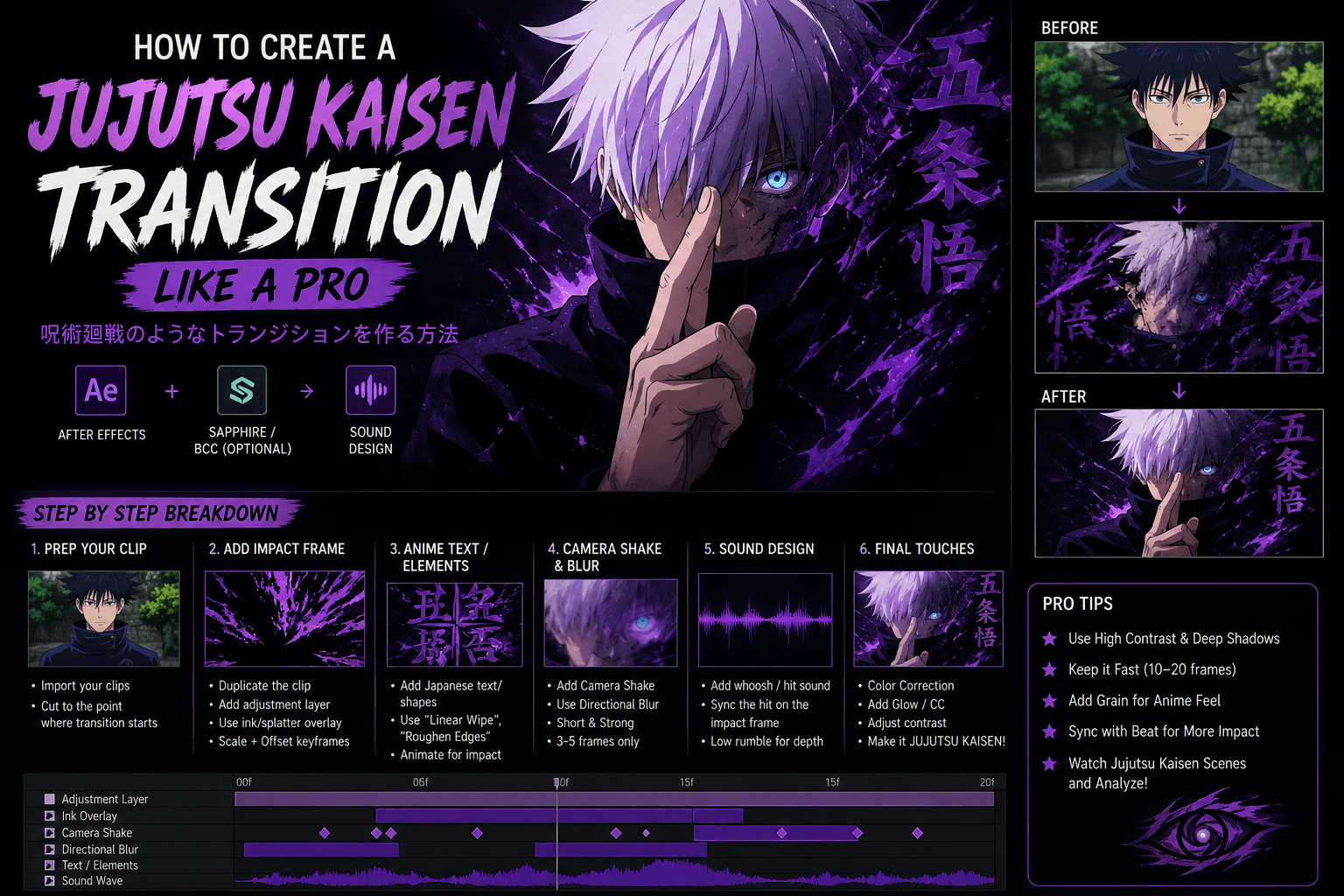
Anime-inspired edits have become one of the biggest trends on TikTok, YouTube Shorts, and Instagram Reels. Among all anime editing styles, the Jujutsu Kaisen Transition stands out because of its powerful energy effects, dramatic impact frames, fast camera movement, and cinematic visual style. If you’ve ever watched an edit featuring Gojo, Sukuna, Yuji, or Megumi and wondered how creators make those incredible transitions, this guide will show you the process.
In this article, you’ll learn how to create a professional Jujutsu Kaisen Transition using simple editing techniques that can be applied in After Effects, Premiere Pro, CapCut, or other video editing software.
What Is a Jujutsu Kaisen Transition?
A Jujutsu Kaisen Transition is a fast-paced anime transition inspired by scenes from the popular anime series Jujutsu Kaisen. These transitions typically include:
- Impact frames
- Purple cursed energy effects
- Motion blur
- Camera shake
- Japanese text overlays
- Flash effects
- Dramatic sound design
- High-contrast color grading
The goal is to transform an ordinary clip into an exciting anime-style scene that feels energetic and cinematic.
Why Is the Jujutsu Kaisen Transition So Popular?
The popularity of the Jujutsu Kaisen Transition comes from the anime’s unique visual style. Characters such as Gojo Satoru and Ryomen Sukuna are known for powerful abilities and visually stunning scenes.
Content creators love using this editing style because:
- It grabs attention instantly.
- It works perfectly for short-form content.
- It creates a professional anime look.
- It increases viewer retention.
- It makes edits feel more dynamic and emotional.
With anime content continuing to trend online, learning this transition can help your videos stand out from the competition.
Step 1: Prepare Your Footage
Before creating a Jujutsu Kaisen Transition, select two clips that will connect smoothly.
Good examples include:
- Character transformations
- Outfit changes
- Gaming highlights
- Action scenes
- Before-and-after edits
Trim your clips carefully and identify the exact frame where the transition should happen.
The stronger your timing, the more impressive the final effect will be.
Step 2: Create an Impact Frame
An impact frame is one of the most important parts of a Jujutsu Kaisen Transition.
To create it:
- Duplicate your video layer.
- Freeze a frame at the transition point.
- Add a flash effect.
- Increase contrast and sharpness.
- Add anime-style textures or ink splashes.
Impact frames usually last between 1 and 3 frames.
This brief visual explosion creates the powerful feeling commonly seen in anime fight scenes.
Step 3: Add Anime Text Elements
Anime-inspired typography helps make the transition look authentic.
You can add:
- Japanese characters
- Manga-style text
- Energy symbols
- Custom graphics
Position the text around the subject and animate it quickly.
Popular effects include:
- Scale animations
- Opacity fades
- Slide-in motion
- Rotation effects
These elements enhance the overall anime atmosphere and make the Jujutsu Kaisen Transition more recognizable.
Step 4: Use Motion Blur
Motion blur creates speed and intensity.
Most editors use:
- Directional Blur
- Radial Blur
- Pixel Motion Blur
Apply the effect during the transition frames only.
Too much blur can reduce quality, so use it carefully.
A small amount of blur combined with camera movement creates a much more professional result.
Step 5: Add Camera Shake
Camera shake is another key component of a successful Jujutsu Kaisen Transition.
The effect simulates the impact of a powerful attack or energy burst.
Best practices:
- Keep shakes short.
- Use random movement.
- Increase intensity during impact frames.
- Combine with blur for maximum effect.
Professional editors often use custom camera shake presets to save time and maintain consistency.
Step 6: Create Purple Energy Effects
One visual feature that instantly reminds viewers of Jujutsu Kaisen is the purple cursed energy effect.
To recreate it:
- Use purple particles.
- Add glow effects.
- Apply energy overlays.
- Use blending modes such as Screen or Add.
- Animate energy around the subject.
The combination of glowing purple elements and dark shadows creates the iconic anime look.
Step 7: Enhance Sound Design
Even the best visuals can feel incomplete without sound.
A professional Jujutsu Kaisen Transition should include:
- Whoosh sounds
- Impact hits
- Bass drops
- Energy effects
- Reverse sounds
Synchronize the sound exactly with the impact frame.
This small detail dramatically increases the power of the transition.
Step 8: Apply Final Color Grading
Color grading brings everything together.
For a Jujutsu Kaisen-inspired look:
- Increase contrast
- Deepen shadows
- Boost purple tones
- Add subtle glow
- Enhance highlights
The final result should feel dark, dramatic, and cinematic.
This step often separates amateur edits from professional ones.
Common Mistakes to Avoid
Many beginners make the same errors when creating a Jujutsu Kaisen Transition.
Avoid these mistakes:
- Using too many effects.
- Excessive motion blur.
- Long impact frames.
- Poor timing.
- Weak sound design.
- Inconsistent color grading.
Remember that anime transitions are usually fast and precise.
Simplicity often creates better results than overwhelming viewers with unnecessary effects.
Tips for Making Viral Anime Edits
If your goal is to gain views on TikTok or YouTube Shorts, consider these tips:
- Keep transitions under one second.
- Follow trending audio.
- Use high-quality footage.
- Focus on smooth timing.
- Add eye-catching thumbnails.
- Post consistently.
Many viral anime editors rely on a clean workflow rather than complicated effects.
Conclusion
A Jujutsu Kaisen Transition is one of the most exciting editing styles for anime fans and content creators. By combining impact frames, camera shake, motion blur, anime text, purple energy effects, and professional sound design, you can create transitions that look dramatic and cinematic.
Whether you’re editing anime clips, gaming content, or social media videos, mastering the Jujutsu Kaisen Transition can significantly improve the quality of your edits. Start with the basics, practice your timing, and gradually add advanced effects to develop your own unique anime editing style.